How to Sync a Rowing Machine with a Fitness Tracker?
On this page (9 sections)
- Connecting Your Rowing Machine to Your Fitness Tracker
- Understanding Your Rower’s Connectivity Options
- Checking Your Fitness Tracker’s Compatibility
- The Pairing Process: Step-by-Step
- Starting Your First Synced Workout
- Troubleshooting Common Connection Issues
- Maximizing Your Data with Connected Workouts
- Conclusion
- Frequently Asked Questions
Yes, you can absolutely sync your rowing machine with your fitness tracker, and it’s often simpler than you might think! Many modern rowers have built-in Bluetooth or ANT+ connectivity. This lets your tracker easily capture your workout data, like distance, time, strokes per minute, and calories burned, without manual entry. It’s a fantastic way to keep all your fitness stats in one place.
Connecting your rower means your workouts get logged automatically. This saves you time and ensures accuracy. You can then see how your rowing sessions compare to other activities. It helps you understand your overall fitness progress better. Think of it as giving your tracker a new piece of your active puzzle.
- Check your rower’s connectivity options (Bluetooth/ANT+).
- Check your fitness tracker’s compatibility list.
- Use the rower’s app or your tracker’s app to pair.
- Ensure both devices are close and charged.
- Start your workout and verify data transfer.
Ready to get your rowing sessions automatically logged? Let’s walk through the simple steps to connect your favorite rower to your fitness tracker, making your data collection a breeze.
Connecting Your Rowing Machine to Your Fitness Tracker
Syncing your rowing machine with your fitness tracker is a smart move. It helps you get a clearer picture of your total fitness. We’ll guide you through making this happen. Most modern rowers are designed with this connectivity in mind.
Understanding Your Rower’s Connectivity Options
Before you can connect, you need to know what your rower offers. Think of this as checking the language your rower speaks. Does it use Bluetooth? Maybe ANT+? These are the common ways devices talk to each other wirelessly.
Bluetooth: The Most Common Connection
Bluetooth is probably what you’re most familiar with. It’s like the standard wireless connection for headphones and speakers. Most newer rowing machines use Bluetooth. This makes pairing with your fitness tracker pretty straightforward.
You’ll want to make sure both your rower and your tracker are set to discoverable mode. This is how they find each other in the crowded wireless world. It’s usually found in the device’s settings menu.
ANT+: A Reliable Alternative
ANT+ is another popular wireless technology, especially in the fitness world. It’s known for being very reliable and low-power. Many cycling computers and advanced fitness trackers use ANT+. If your rower has ANT+, you might need a tracker that supports it too.
Sometimes, you might see devices that support both Bluetooth and ANT+. This gives you more flexibility in how you connect. Check your rower’s manual to be sure.
Checking Your Fitness Tracker’s Compatibility
Just like your rower needs a way to connect, your fitness tracker needs to be able to receive the signal. Not all trackers can read data from every rowing machine. It’s important to check this early on.
Consult Your Tracker’s App or Website
The best place to start is your fitness tracker’s official app. Most companies have a list of compatible devices or sensors. You can usually find this in a “Device Settings” or “Connected Devices” section. Sometimes, you might need to visit the manufacturer’s website.
Look for a specific mention of rowing machines or ergometers. This will save you a lot of guesswork. If you don’t see your rower listed, don’t panic just yet. There might still be workarounds.
What If Your Tracker Isn’t Directly Compatible?
If your fitness tracker doesn’t natively support your rower, don’t give up hope! Many rowers come with their own companion apps. These apps often can export data. You might be able to manually upload this data to your preferred fitness platform later. Some third-party apps also act as bridges. They can capture data from your rower and then send it to your tracker’s ecosystem.
The Pairing Process: Step-by-Step
Once you know both devices are ready, it’s time to pair them. This is like introducing your devices so they can recognize each other. The exact steps can vary, but the general idea is the same.
Step 1: Prepare Your Devices
First things first: make sure both your rowing machine and your fitness tracker are charged. A low battery can interrupt the pairing process. You’ll also want to have them relatively close to each other. This helps ensure a strong connection signal.
Turn on the Bluetooth or ANT+ on your fitness tracker. You’ll typically find this in the settings menu of your tracker or its companion app. Make sure your rower is also powered on and its connectivity feature is active.
Step 2: Initiate Pairing from Your Rower or Tracker
There are two main ways pairing usually happens. Some rowers will search for nearby devices. Others will require you to search for the rower from your tracker.
Option A: Pairing from the Rower: Many rowers have a “Connect Device” or “Pair Sensor” option on their console. Select this and have your rower scan for your fitness tracker. When your tracker’s name appears, select it to initiate the connection.
Option B: Pairing from the Tracker: Go into your fitness tracker’s app or settings. Look for an option to add a new sensor or device. Select “Rowing Machine” or a similar category if available. Your tracker will then search for nearby compatible rowers. Select your rower’s name when it appears.
Step 3: Confirm the Connection
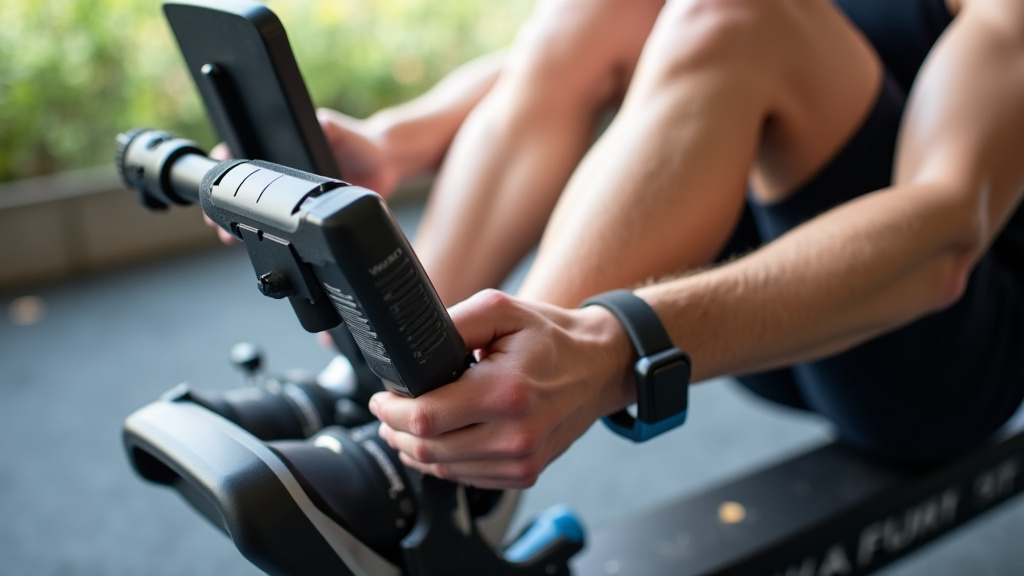
You might be asked to confirm a pairing code or simply acknowledge the connection. Once they’re paired, your rower should appear as a connected device in your tracker’s app. It might be listed as a “chest strap” or “power meter” depending on how your tracker interprets the data. Don’t worry too much about the exact label.
Starting Your First Synced Workout
Now for the exciting part! You’ve done the setup, so let’s see it in action. It’s important to start your workout correctly to ensure the data flows.
Begin Your Workout on the Rower
Start your rowing session on the machine itself. Don’t start the workout from your fitness tracker. The rower is the primary source of data in this scenario. Let the rower begin tracking your strokes, time, distance, and power.
Verify Data Transfer
After a minute or two of rowing, check your fitness tracker. You should see the workout start to populate with data. This might include duration, distance, and heart rate if your tracker also monitors that. Some trackers might show strokes per minute or pace.
If you don’t see any data coming through, don’t get discouraged! You might need to go back and check the pairing steps. Ensure the rower’s display is showing it’s connected to a device. Sometimes, restarting both devices can help.
Troubleshooting Common Connection Issues
Even with the best technology, things don’t always work perfectly the first time. Here are a few common hurdles and how to jump over them.
Check Your Distance
Bluetooth and ANT+ have a limited range. Keep your devices within a few feet of each other. If you’re using a standalone rower console, keep your tracker nearby. Walls and other electronic devices can sometimes interfere with the signal.
Battery Levels Matter
We mentioned this before, but it bears repeating. Low batteries on either device can cause connection problems. Ensure both are adequately charged before you attempt to pair or work out.
Software Updates
Like any technology, both your rower’s firmware and your fitness tracker’s software may need updates. Check the respective apps or manufacturer websites for any available updates. Sometimes, a simple software update can resolve nagging connectivity issues. Many experts recommend keeping your devices updated (CDC).
Restart and Re-Pair
If you’re experiencing persistent issues, try turning both devices off completely. Wait about 30 seconds, then turn them back on. After they boot up, try the pairing process again. A fresh start can often clear temporary glitches.
Maximizing Your Data with Connected Workouts
Once you have a stable connection, you’ve opened up a world of data. This information can help you track progress and stay motivated. Seeing your rowing data alongside your other activities provides a complete fitness journal.
Understand Your Rowing Metrics
Your rower likely tracks more than just distance and time. Look for metrics like strokes per minute (SPM), split times, and wattage (power output). Your fitness tracker might not display all of these directly during the workout, but they should be recorded. Post-workout, you can often see a more detailed breakdown in your rower’s app or your tracker’s platform.
Integrating Rowing into Your Overall Fitness Plan
Rowing is a fantastic full-body workout. By syncing it with your tracker, you get credit for this effort alongside your runs, swims, or gym sessions. This helps give you a more accurate view of your daily calorie burn and overall activity levels. Many health organizations suggest combining different types of exercise for best results (NIH).
Monitor Your Progress Over Time
With your rowing workouts automatically logged, you can easily see trends. Are you rowing further or faster? Is your power output increasing? This data can be incredibly motivating. It shows you how far you’ve come. Consistency is key for fitness gains (Mayo Clinic).
Here’s a quick checklist to ensure you’re ready to connect:
- Confirm your rower has Bluetooth or ANT+.
- Verify your fitness tracker supports connectivity.
- Ensure both devices are charged and nearby.
- Turn on Bluetooth/ANT+ on your tracker.
- Follow the pairing steps in your rower or tracker app.
- Start your workout on the rower and check for data.
Conclusion
You’ve now learned how to connect your rowing machine to your fitness tracker. This step makes tracking your workouts incredibly easy. You’ll get a complete picture of your fitness journey. No more forgetting to log those intense rowing sessions! By pairing your devices, you simplify your data collection. This allows you to focus on your training and celebrate your progress. Ready to see all your hard work in one place? Take the first step today and get your rower connected!
Frequently Asked Questions
How do I know if my rowing machine can sync with a fitness tracker?
Check your rowing machine’s manual or the manufacturer’s website. Most modern rowers list their connectivity features, usually Bluetooth or ANT+. If it has these, it’s likely compatible with many fitness trackers.
What if my fitness tracker isn’t directly compatible with my rower?
Don’t worry! Many rowers have their own apps that can export data. You can often manually upload this to your tracker’s platform. Some third-party apps also act as bridges between devices.
Do I need to start the workout on my rower or my tracker?
Always start your workout on the rowing machine itself. Your rower is the primary source of your workout data. Your tracker should then automatically pick up the session details from the rower.
Why isn’t my rower showing up when I search for it on my tracker?
Ensure both devices are powered on, charged, and close together. Double-check that Bluetooth or ANT+ is enabled on both. Sometimes, restarting both devices can resolve connection issues.
Will my fitness tracker show all the data my rower collects, like strokes per minute?
Your tracker may not display every single metric from your rower in real-time. However, most connected sessions will record detailed metrics like strokes per minute, power, and split times. You can usually view these in the post-workout breakdown on your tracker’s app.